Docs · Integration
Add to magpie
Hand your users one link, and your models show up in every agent they run: Claude Code, Codex, OpenCode, Gemini CLI, Pi, Crush. No config files, no environment variables, no copy-pasting base URLs.
Quick start
- Build a linkDescribe your endpoint as URL parameters: a name, a base URL per API you speak, and optionally the user’s key and the models to offer.
- Put it behind a buttonOn your dashboard, next to the key you just minted: Add to magpie.
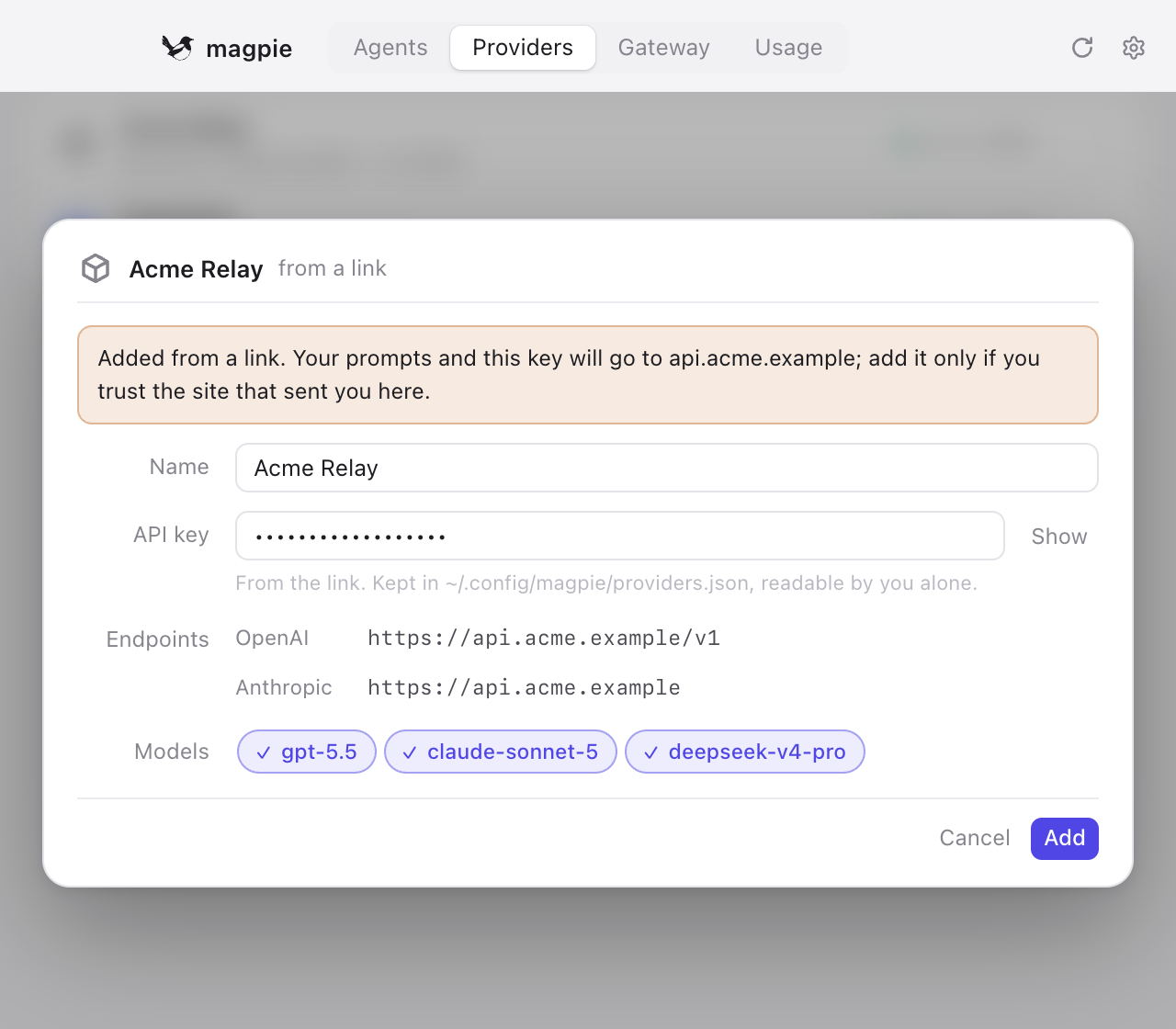
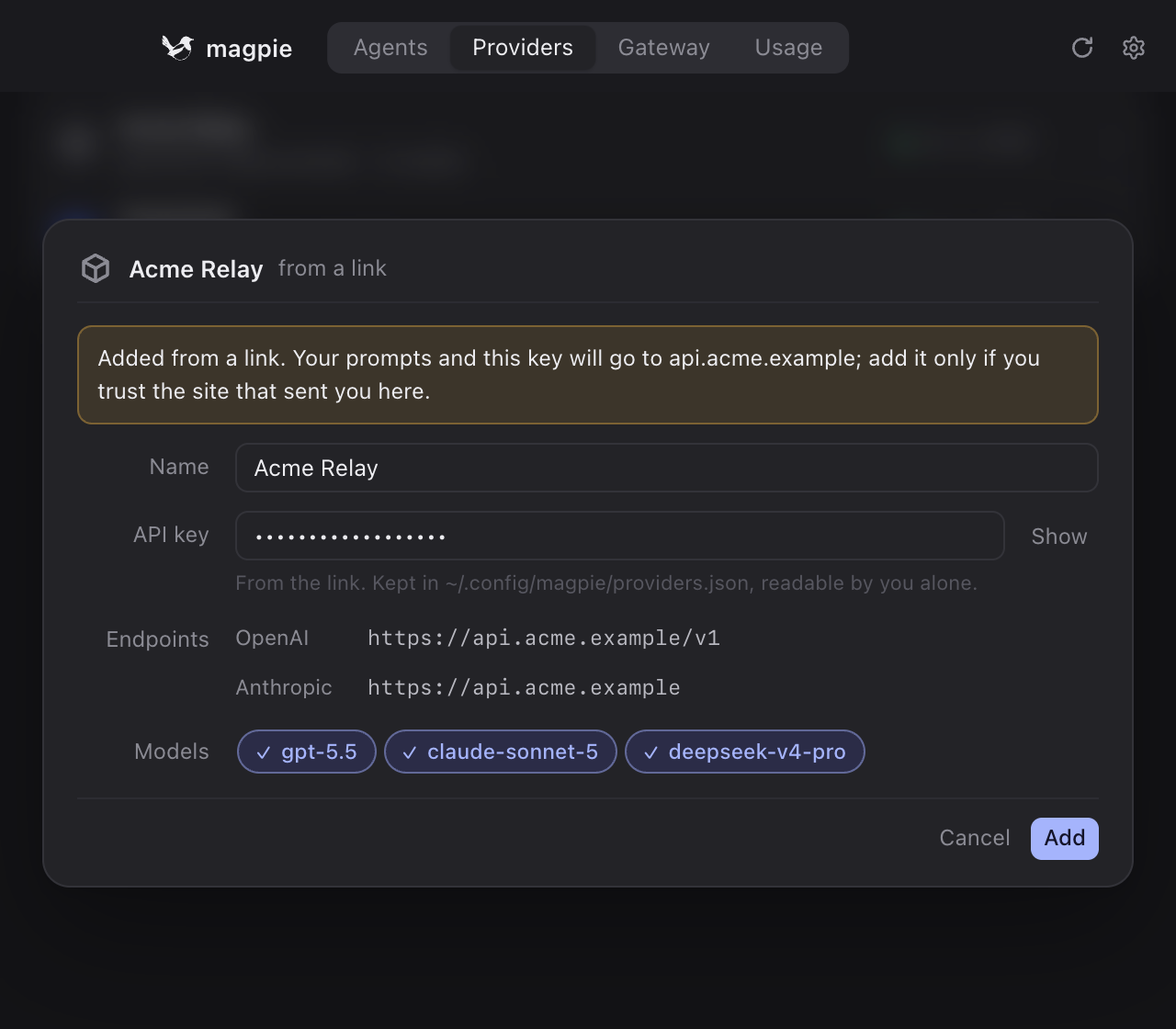
- The user confirmsmagpie opens, shows exactly where prompts and the key will go, and adds the provider when the user says yes. Every agent can use it right away.
https://usemagpie.ai/import#name=Acme%20Relay&chat=https://api.acme.example/v1&anthropic=https://api.acme.example&key=sk-…&models=gpt-5.5,claude-sonnet-5
The link
magpie registers the magpie:// scheme with the system. An import link is that scheme, the word import, and a query string:
On the web, link to the same parameters on usemagpie.ai/import instead, after a #:
Why the https link
It works everywhere a link does: GitHub READMEs, chat apps and email clients drop or block custom schemes. It opens magpie, and offers the download when magpie isn’t installed yet.
Why after the #
Browsers never send the fragment to a server. The key goes from your page to the user’s machine without passing through usemagpie.ai, not even its logs.
Every value is URL-encoded, as URLSearchParams or urlencode produce. Both %20 and + work for spaces.
Parameters
A link either names one of magpie’s presets, which already knows the vendor’s endpoints, or describes a provider from scratch with a name and at least one base URL.
| Parameter | Meaning |
|---|---|
nameor preset | What the provider is called in magpie, at most 80 characters. |
chat | OpenAI Chat Completions base URL, ending in /v1 (magpie appends /chat/completions). |
responses | OpenAI Responses base URL, ending in /v1. Codex speaks only this API; magpie translates for it when you don’t. |
anthropic | Anthropic Messages base URL: the root, without /v1. |
key | The user’s API key. Leave it out and the user pastes one in the dialog. |
models | Model ids to offer the agents, comma separated. Without it, magpie lists the models your /v1/models returns. |
id | The id agents use in id/model. Defaults to the name, lowercased with dashes (Acme Relay → acme-relay). |
catalog | A models.dev provider id whose metadata applies (display names, context sizes, reasoning levels), e.g. openai for a relay of OpenAI models. |
website | Your site (https). Shown on the provider’s page. |
keys | The page where users make keys (https). The dialog links to it when the link has no key. |
icon | A picture of your own (https): PNG, JPEG, GIF, WebP, ICO or SVG, at most 1 MB. magpie downloads it once, after the user confirms the import, and keeps it beside the provider. Without one, magpie shows the catalog vendor’s logo or a plain mark. |
presetor name | A preset id; its endpoints, catalog and pages are used, and name may rename it. |
region | With a preset that has regions, which one. |
At least one of chat, responses and anthropic is required without a preset; give every API you speak, and each agent uses the one it speaks natively. Base URLs must be https, except plain http to localhost, loopback, private addresses and *.local, where model servers usually run without TLS. They can’t carry a query, a fragment or credentials.
Presets
Vendors magpie already knows. magpie presets prints the current list.
anthropicopenaigoogledeepseekxaimoonshotKimimoonshot-cnzhipuGLMzaiminimaxminimax-cnqwenqwen-cnmistralgroqopenrouteropencode-goopencode-zentogetherfireworkssiliconflowaihubmix302aiyylxauto · global · cnollamalmstudio
A vendor with a preset only needs to add the key: magpie://import?preset=deepseek&key=sk-…. Want yours on the list? Open an issue.
Link builder
Fill in your endpoint; the link, the button and the Markdown follow as you type. Everything stays in this page.
 Try it
The button
Two ready-made badges, one for light pages and one for dark. Link them to your import link, or draw your own button: the words Add to magpie and the bird are yours to use.


<a href="https://usemagpie.ai/import#preset=deepseek&key=sk-…">
  <img src="https://usemagpie.ai/img/add-to-magpie.svg" alt="Add to magpie" width="176" height="40">
</a>
[](https://usemagpie.ai/import#preset=deepseek)
For dark pages, use add-to-magpie-light.svg. A public page like a README should never carry a key; leave key out and the user pastes their own.
From your backend
The natural place for the button is the page that shows a freshly minted key. Build the link where you have it:
const params = new URLSearchParams({
  name: "Acme Relay",
  chat: "https://api.acme.example/v1",
  anthropic: "https://api.acme.example",
  key: apiKey,
  models: ["gpt-5.5", "claude-sonnet-5"].join(","),
  icon: "https://acme.example/logo.svg",
});
const href = "https://usemagpie.ai/import#" + params;
from urllib.parse import urlencode

href = "https://usemagpie.ai/import#" + urlencode({
    "name": "Acme Relay",
    "chat": "https://api.acme.example/v1",
    "anthropic": "https://api.acme.example",
    "key": api_key,
    "models": "gpt-5.5,claude-sonnet-5",
    "icon": "https://acme.example/logo.svg",
})
magpie import 'magpie://import?preset=deepseek&key=sk-…' # asks first; -y to skip
Security
An import link is a suggestion. The user decides.
- Always confirmed. magpie shows the name, every host that prompts and the key will go to, and the models, and saves nothing until the user presses Add. The user can rename it, or replace the key, first.
- No silent overwrites. When the id is already taken, the dialog says so and the button reads Replace.
- https only. Plain http is refused except to this machine or the local network;
file:, credentials in URLs and other schemes are refused outright. - Read once. Inside the app, the link’s contents are handed to the window a single time; a reload doesn’t bring the dialog back.
- Icons are fetched, not embedded. An
icon=URL is downloaded by magpie itself, only after the user confirms the import, only over https, and only into its own icons folder — at most 1 MB, and the type is checked. The host is resolved at connection time and magpie refuses to connect when it lands on loopback, private, link-local or reserved addresses, so a name that points back at the user’s own machine (or a DNS-rebinding trick) is refused. The page and the dialog never load a remote picture directly. - Keys stay out of servers. The web link keeps parameters in the fragment. The key ends up only in
~/.config/magpie/providers.json, readable by the user alone.
Platforms
| System | How magpie:// gets registered |
|---|---|
| macOS | By the app itself, as soon as magpie.app is in Applications. |
| Windows | For the current user, the first time magpie runs. |
| Linux | By a desktop entry (x-scheme-handler/magpie), written by the installer and again on first run. |
| Terminal | magpie import <link> shows the same summary and asks before adding. |
Import links need magpie 0.1.8 or later. When magpie is already running, the link goes to that instance and its window comes forward.